 GVOID
GVOIDAudio Studio
Built by GVOID
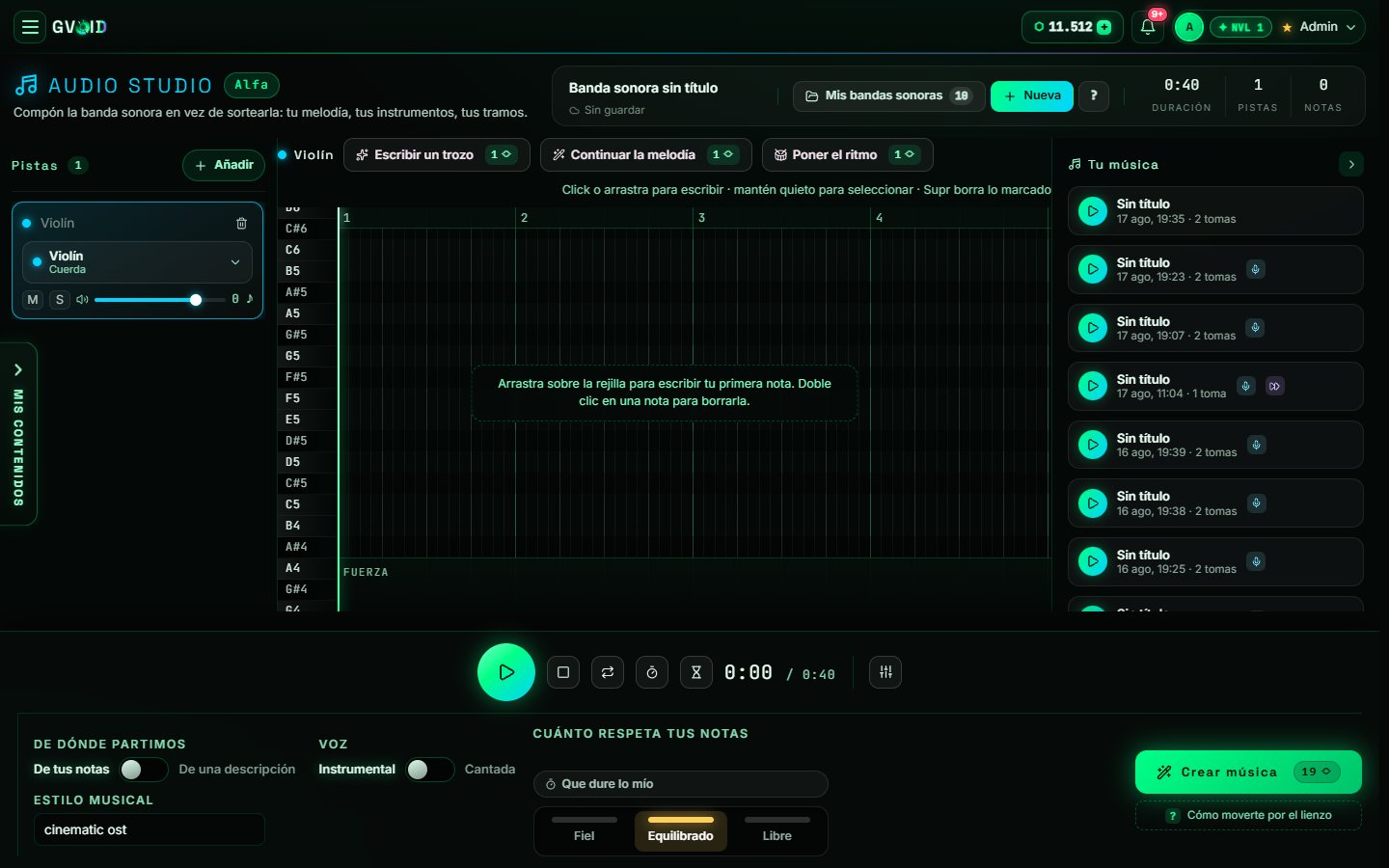
Compose the soundtrack instead of rolling the dice: tracks per instrument, notes on the grid, lyrics on the bars and two takes per run.
What is Audio Studio?
Audio Studio is a grid composer: you add tracks per instrument (violin, strings, percussion…), write notes by dragging on the bars or ask the AI to write a bit, continue the melody or set the rhythm. Lyrics are written on the bars where they should be sung and the voice switches itself on. You choose the musical style, whether to start from your notes or from a description, and how much it respects yours (faithful, balanced or free). When you press Create music, the score is played for real and comes back with two takes to choose from; everything stays in Your music and in your saved soundtracks.
What you can create
Ideal for creators, studios and brands.
How it works in GVOID
No installs. Create in your browser on a node canvas and chain models together.
Add the node
Drop Audio Studio onto your canvas.
Describe it
Write your prompt or connect an input.
Generate
Pay only for what you create — start free.
Combine
Chain with voice, music and upscaling.
Frequently asked questions
What is Audio Studio?
How much does Audio Studio cost?
Can I combine Audio Studio with other models?
Related models
Create with Audio Studio today
Video, image and voice on one AI canvas. No subscription — start free.
Start free →